
Apex Trade Assistant For Sniper Trading
Watch This First
Combine Analysis With Automation
Reminder to watch the Sniper Training First Before Diving Into Automation Steps 1-8 HERE
Join our Skype room for any Apex ONLY related Markers Plus Questions CLICK HERE
1) Installing Markers Plus & Updating Toolkit
2) Activation
3) Loading Templates
Different Accounts/Sim/Live
4) Application & Practice
Apex TA templates require Markers Plus.
If you have a newer version of MP or NT already, uninstall it, then install the necessary version.
(If you are redirected to a Google Drive page, click the download button there)
5) Master Sniper Template
Latest Template - Must Watch
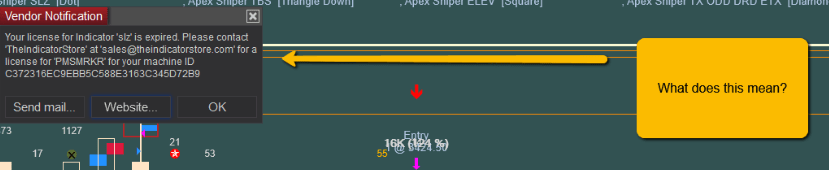
What does it mean when it says your key has expired? And what do you do?
1) Do not email the one listed on the message
2) If you plugged in a flash drive unplug it and restart your pc
3) If you still have the message your machine id changed due to flash drive, new hardwae, or a windows update
4) Email support uder account at the top with your new machine id (include both machine ID's if you have 2 computers)
TA Master Cheat Table Image
1) Download Stickies and Install
2) Download/Save Table Image
2) Open Stickies in Task Bar Near Clock
4) Open Image and Copy
5) Paste Image in Stickies
6) Right Click on Stickies Pin to Top
7) Put over Chart To Right of AT
Stickies Program HERE
Overlay Chart Sheet Table HERE
Other cheat Table HERE
FAQ
Here are answers to some Frequently Asked Questions
Please Take 15 Minutes To Review Them As They Will Help You A Lot!
I am having issues with Market replay. How do i use it. How do i fix it? How do i get it to take trades? Why is it taking trades that it shouldn't
Market replay is finicky follow these EXACT steps when using market replay:
Preparation: Close all unneeded programs ie chrome fb msngr etc check task manager for anything running and charts. Disconnect any external monitors, don't connect remotely on replay)
1 Download replay data day(s)
2 Close ninja (with just empty workspace open or easy open) and clear cache in apex toolkit under tools
3 Open ninja load just 1 chart and connect to live data
4 Disconnect from data
5 Close chart
6 Connect to market replay
7 Choose date
8 Choose time and pause (doing this before loading chart saves you from having to reload template if you open chart first then select time right click amd reload template after changing time)
9 Load Semi_Auto Replay Template
10 Choose replay 101 in both top and right for account
11 Choose atm on right (or set up and save as shown in video on training page)
12 Select atm
13 Turn on semi
14 Choose long or short according to rules
15 Hit play at 1 x speed then hit pause
16 After 6 bars hit f5 and then right click on indicators and click okay
17 Select long or short as it changes or deselect according to rules
18 After every trade reselect short or long according to rules
19 If change time reload REPLAY chart template hit pause
20 Hit f5 and then right click on indicators and click okay after 6 bars Repeat steps as needed accordingly
How Do I Find My Machine ID?
Go To Tools Help - About - Then copy and paste the Machine ID into a help desk ticket under Account
I Signed Up - What Next?
•Assure you have watched the videos under steps 1 - 8 on the sniper/bootcamp page so you know the rules of the system and how to use Ninja Trader
•Assure you did proper machine ID
–Under Help About (Machine ID NOT Key)
–If you submitted the wrong one or did not submit it copy and paste it into a help desk ticket
•Help desk only handles activation's – allow 72 hours (Use the skype room for any support)
•Complete Training Course- where is it
•Skype Room Link (only typing no audio but we can do remote logins if necessary)
–Dennis, Gabe, Brad, and Darrell are the main room leaders others can help as well.
•Update Toolkit and Templates
•Updates To Markers Plus / Trading Assistant and Templates
–As we make updates we will post in the skype room, on ninja, and email you
–As new versions of the markers plus comes out we will email you and post in the skype room with the download link on the training page
•
What is the difference between Advanced, Replay, and the normal Template
The TX_Semi Auto uses a 0 tick offset and the order must fill in one bar or it will be cancelled.
The TX_SemiAuto_Advanced uses a 1 tick offset and the order must be filled within 2 bars. If you get a 1 tick fill make sure to adjust your take profit to be 10 ticks above below the high of the bar. If you get filled late close the trade. If the market hits the take profit turn of the Long/Short so it does not take the trade.
The replay template is for using in market replay.
Can I use this on multiple instruments?
Yes you can use this on as many instruments as you want just remember more charts will slow down computer performance depending on your computer and could cause entries to be late. We suggest only doing 2 instruments and using a different template ie template semiauto2 advanced for the second one.
Should I unzip the install file?
No do not unzip the file. Use the arrow on the right side of the file in the browser to download it. Then go to Tools, Utilities, Import NinjaScripts to import it
What is the difference between semi auto and auto?
Auto will continue to place trades on whatever is selected long and/or short.
Semi auto will place one trade and then deselect Long and/or short this is the safest wisest choice to choose.
Note it will also deselect if the order is placed and not filled.
If my ATM does not match the one selected on the right will if fire off a trade?
No make sure to make the ATM and save the ATM and then select it on the right and then at the top.
What do i do if Ninja is crashing?
Open the toolkit and clear all cache. Then open NinjaTrader and go to tools options data reset database. Then close and reopen ninjatrader. Go to the skype room if still having issues.
Should I change anything when i save my workspace or close down?
Always deselect long and short and turn to off before saving your workspace or closing down?
The trade assistant is not taking trades why?
Make sure your ATM matches the top and left and your account is selecteced. F5 your chart with the trade assistant turned OFF. Right click on indicators and click OK with the trade assitant turned off. Then Turn it back on. If still having issues hop in the skype room.
I got a NinjaScript files error when i tried to import the file why?
You have a indicator with errors.
Go to tools > edit ninjascript> indicator
Select any indicator and press f5
It will show what indicators have errors
Delete those indicators.
If you need further assistance hop in the skype room.
I got a Markers Variable boxup is already in use error what does this mean?
This means you either have a workspace open in the background with the same template or you loaded the same template 2x on the same insturment. Please close the background workspace and/or use the semi_Auto2 or semo_auto2 Advanced template for the 2nd chart
I put a quantity of 5 in but t only did 1 contract why?
Make a new ATM with the quantity you want and then save it. Then select it on the right and the top and it will use that quantity. Delete old ATM. Don't edit an existing ATM.
What SIM Settings do you use?
Go to tools, data, Simulation and change the settings.
Delay Comm - 0
Delay Exchange - 0
Wait for data - 0
Enforce partial fills - X
Enforce immediate fills - X
Can I add in other filters, DR, MM, Paw, only take Enhanced? Will Apex be making more Templates for other trades or Enhanced? If so how do I use them and if not when will they be available?
We do have a DR filter in the templates when you click F it turns on the DR Filter. We may release other Templates soon, but need to master using this for now, before wanting more.
Markers Plus can do many things, you can read more about it all from links on the Training Course page, but master what you have first!
I Auto Trade one chart, but the trade shows up on a different chart?
You have same account selected, chart markers turned off on one, but turned on, on the otherer
Trades aren't being taken or a random one was taken how do i resync?
(This happens when markets are going insanely fast most often and when markets are moving super fast make sure to do this every 2-3 hours)
1) Right click chart reload the template
2) Choose atm and account again
3) (after 6 bars have printed hit F5
4) Click indicators and click okay then renable the Semi Auto Trading Assistantr
the
If i change offsets in NinjaTrader Chart Properties does it change the auto trader?
No the chart trader properties have no impact on the auto trader.
When should I clear my cache?
If data is off from room and others charts and EVERYTIME you close and reopen NinjaTrader
Should I reset my modem to make it faster?
Yes unplugging your modem and router counting waiting 2 minutes for all power to cycle out and then plugging back in will improve performance.
Should I contact the help desk for support?
No the help desk is only for changing machine ID's if you contact them they will send you to the skype room. Link at top and bottom of this page.
How long can activation take? What if I get a message it is not active and to email someone my machine ID?
Activation's take up to 3 business days. Do not email anyone if you get this message. If 3 business days have passed since you bought and you still have this message submit a help desk ticket. It will also take 3 days to change a machine ID or add another machine ID (ie if your submitting the 2nd machine ID after purchasing)
How Do I Change My Machine ID?
Go To Tools Help - About - Then copy and paste the Machine ID into a help desk ticket under Account with a note you want to change your machine ID. Expect it to take 3 business days to change your machine id after submitted.
How Do I Upgrade My Toolkit / Get New Templates?
Simply click the Apex logo on your desktop to open the toolkit click Install and choose the latest version and click OK
Why is there a SemiAuto and SemiAuto2 and a SemiAuto_Advanced and SemiAuto_Advanced2?
If you want to trade the same instruments on 2 accounts at the same time you must use two templates. As the templates can not have the same paramters (ie a regular and a retirment account both trading NQ you would use SemiAuto on one account and SemiAuto2 on the other account
Will it take NQ trades on MNQ and vice versa?
It will only take trades based on the instrument you have selected. For instance if you are trading MNQ it will only place trades on MNQ. You will have to manually place trades that have setups on NQ on the MNQ chart.
Must i select my account?
Yes you must select your account make sure the right one is selected then select it at the top. You can also choose to select it by right clicking instruments then going to markers plus / trading assistant and choosing the account in the indicator.
How do i ensure it will not place trades?
Select off to ensure it does not place a trade do not leave it on auto/semi auto and deselect long/short
Must I reselect long/short after every order placed?
Yes if a order is placed and filled or a order is placed and not filled you must reselect Long/Short for it to place a trade again on semi-auto
Should I reload a chart when the trade assistant is turned on?
No do not f5 or reload a chart with the trade assistant turned to on. Always turn it off.
What do I do if something is not working right?
Turn it to OFF then press f5 then right click on indicators and click okay. To resync the trade assistant. Then turn it back on.
I got an email I'm activated but it's still not showing active what do i do?
Close NinjaTrader and reopen it. If it is still giving you the not active message send a support ticket with your machine ID
I heard order placed and cancelled why?
This means the limit order was placed but the market moved past it before filling without retracing to it. This may happen in a slow or fast market and would happen the same with a manually placed trade. To increase your probability of getting filled use the advanced template as it gives you 1 tick offset more and another bar to get filled.
If i change offsets in NinjaTrader Chart Properties does it change the auto trader?
No the chart trader properties have no impact on the auto trader.
I got a corrupt file error message when importing what do i do?
Hop in the skype room so Gabe can help you.
Is this for NinjaTrader 7 & 8
Currently the indicators and templates are only available on Ninja 7. When NinjaTrader 8 is made available with the apex toolkit we will make those available at no extra charge for Elite Members.
What is a Limit Order?
A limit order places a order at the price set and will fill at that price or better or be cancelled. This is better than a market order as you can get filled at entry price. The automation is used in limit orders for entry and take profit and market orders for exit. However it he market moves past the price and does not return it will not get filled. when using a limit order.
I want to change up the chart colors, settings, move things around, have buttons on other areas, add indicators to template, customize it all up how do i do this?
We suggest you leave the Template as is. If you do change it up you need to save it under different name. Remember we release updated templates at times and you will have to update later. The templates are made this way for a reason, to work.
We suggest using your custom templates on another chart if you are wanting to look at other indicators or confirmations and leave the Markers Plus Template as is
Should I demo trade or live trade or what should I do first?
•Demo trade Semi Auto Trading and master it before going live
•Take the time to learn in and understand the software
•Skype room is not a place for handholding – watch videos!
•Semi Auto trading YOUR LIVE money, it is worth YOU learning to use it!
•Be patient, don’t get frustrated, invest the time to learn!
What other markets can I trade and what tick size and ATM do I use?
•You can trade any market you desire
Many traders trade YM, ES, RTY, FDAX, NKD, FTSE, 6A, 6B, 6J, 6N, 6A, GC, CL
On ES make sure to right click on chart go to institutional order prints indicator then edit the Institutional Block Order settings to 250. This is only on ES.
We use 10 ticks on NQ YM ES RTY FTSE
We use 8 ticks on CL
We use 6 ticks on all Forex Spot and Futures (6 instruments), GC, NKD, and FDAX
For your atm make your ATM the bar size -1 for take profit and make your stop the bars size *2 + 1
ie a 6 tick would be 5 tick take profit 13 tick stop
If I have 2 markets open with ATM's and i see on execute improperly what should I do.
1st resync each chart
1) Right click chart reload the template
2) Choose atm and account again
3) (after 6 bars have printed hit F5
4) Click indicators and click okay then renable the Semi Auto Trading Assistantr
2nd it is advisable to use the template with a 2 on it when trading a 2nd instrument or 2nd account so the code does not get confused.
What if i want to change accounts?
Turn the trade assistant to off, change the account, hit f5, then right click indicators and click okay to resync
Should I leave my computer on?
Yes so it can collect OP Data
Close, reboot, clear cache between 5 and 6 pm and restart. Also do this on the weekends.
Should I run on multiple markets in fast markets?
If markets are extremely fast its best just to run it on one market.
Should I use it with External Graphics Cards
No external graphics cards do not have video ram and will greatly lower your performance.
NINJATRADER 7
1) Installing Markers Plus & Updating Toolkit
2) Loading Templates
Different Accounts/Sim/Live
3) Application & Practice
4) Master Sniper Template
Latest Template - Must Watch
TA Master Cheat Table Image
1) Download Stickies and Install
2) Download/Save Table Image
2) Open Stickies in Task Bar Near Clock
4) Open Image and Copy
5) Paste Image in Stickies
6) Right Click on Stickies Pin to Top
7) Put over Chart To Right of AT
Stickies Program HERE
Overlay Chart Sheet Table HERE
Other cheat Table HERE
FAQ
Here are answers to some Frequently Asked Questions
Please Take 15 Minutes To Review Them As They Will Help You A Lot!
I am having issues with Market replay. How do i use it. How do i fix it? How do i get it to take trades? Why is it taking trades that it shouldn't
Market replay is finicky follow these EXACT steps when using market replay:
Preparation: Close all unneeded programs ie chrome fb msngr etc check task manager for anything running and charts. Disconnect any external monitors, don't connect remotely on replay)
1 Download replay data day(s)
2 Close ninja (with just empty workspace open or easy open) and clear cache in apex toolkit under tools
3 Open ninja load just 1 chart and connect to live data
4 Disconnect from data
5 Close chart
6 Connect to market replay
7 Choose date
8 Choose time and pause (doing this before loading chart saves you from having to reload template if you open chart first then select time right click amd reload template after changing time)
9 Load Semi_Auto Replay Template
10 Choose replay 101 in both top and right for account
11 Choose atm on right (or set up and save as shown in video on training page)
12 Select atm
13 Turn on semi
14 Choose long or short according to rules
15 Hit play at 1 x speed then hit pause
16 After 6 bars hit f5 and then right click on indicators and click okay
17 Select long or short as it changes or deselect according to rules
18 After every trade reselect short or long according to rules
19 If change time reload REPLAY chart template hit pause
20 Hit f5 and then right click on indicators and click okay after 6 bars Repeat steps as needed accordingly
How Do I Find My Machine ID?
Go To Tools Help - About - Then copy and paste the Machine ID into a help desk ticket under Account
I Signed Up - What Next?
•Assure you have watched the videos under steps 1 - 8 on the sniper/bootcamp page so you know the rules of the system and how to use Ninja Trader
•Assure you did proper machine ID
–Under Help About (Machine ID NOT Key)
–If you submitted the wrong one or did not submit it copy and paste it into a help desk ticket
•Help desk only handles activation's – allow 72 hours (Use the skype room for any support)
•Complete Training Course- where is it
•Skype Room Link (only typing no audio but we can do remote logins if necessary)
–Dennis, Gabe, Brad, and Darrell are the main room leaders others can help as well.
•Update Toolkit and Templates
•Updates To Markers Plus / Trading Assistant and Templates
–As we make updates we will post in the skype room, on ninja, and email you
–As new versions of the markers plus comes out we will email you and post in the skype room with the download link on the training page
•
What is the difference between Advanced, Replay, and the normal Template
The TX_Semi Auto uses a 0 tick offset and the order must fill in one bar or it will be cancelled.
The TX_SemiAuto_Advanced uses a 1 tick offset and the order must be filled within 2 bars. If you get a 1 tick fill make sure to adjust your take profit to be 10 ticks above below the high of the bar. If you get filled late close the trade. If the market hits the take profit turn of the Long/Short so it does not take the trade.
The replay template is for using in market replay.
Can I use this on multiple instruments?
Yes you can use this on as many instruments as you want just remember more charts will slow down computer performance depending on your computer and could cause entries to be late. We suggest only doing 2 instruments and using a different template ie template semiauto2 advanced for the second one.
Should I unzip the install file?
No do not unzip the file. Use the arrow on the right side of the file in the browser to download it. Then go to Tools, Utilities, Import NinjaScripts to import it
What is the difference between semi auto and auto?
Auto will continue to place trades on whatever is selected long and/or short.
Semi auto will place one trade and then deselect Long and/or short this is the safest wisest choice to choose.
Note it will also deselect if the order is placed and not filled.
What does the F (Filter do?)
It ensures trades are only placed with the direction of DR on the bar of the setup bar and the bar before that matching the direction chosen. Click it to select it and unclick it to deselect it (such as when there is divergence or a enhanced TX setup)
If my ATM does not match the one selected on the right will if fire off a trade?
No make sure to make the ATM and save the ATM and then select it on the right and then at the top.
What do i do if Ninja is crashing?
Open the toolkit and clear all cache. Then open NinjaTrader and go to tools options data reset database. Then close and reopen ninjatrader. Go to the skype room if still having issues.
Should I change anything when i save my workspace or close down?
Always deselect long and short and turn to off before saving your workspace or closing down?
The trade assistant is not taking trades why?
Make sure your ATM matches the top and left and your account is selecteced. F5 your chart with the trade assistant turned OFF. Right click on indicators and click OK with the trade assitant turned off. Then Turn it back on. If still having issues hop in the skype room.
I got a NinjaScript files error when i tried to import the file why?
You have a indicator with errors.
Go to tools > edit ninjascript> indicator
Select any indicator and press f5
It will show what indicators have errors
Delete those indicators.
If you need further assistance hop in the skype room.
I got a Markers Variable boxup is already in use error what does this mean?
This means you either have a workspace open in the background with the same template or you loaded the same template 2x on the same insturment. Please close the background workspace and/or use the semi_Auto2 or semo_auto2 Advanced template for the 2nd chart
I put a quantity of 5 in but t only did 1 contract why?
Make a new ATM with the quantity you want and then save it. Then select it on the right and the top and it will use that quantity. Delete old ATM. Don't edit an existing ATM.
What SIM Settings do you use?
Go to tools, data, Simulation and change the settings.
Delay Comm - 0
Delay Exchange - 0
Wait for data - 0
Enforce partial fills - X
Enforce immediate fills - X
Can I add in other filters, DR, MM, Paw, only take Enhanced? Will Apex be making more Templates for other trades or Enhanced? If so how do I use them and if not when will they be available?
We do have a DR filter in the templates when you click F it turns on the DR Filter. We may release other Templates soon, but need to master using this for now, before wanting more.
Markers Plus can do many things, you can read more about it all from links on the Training Course page, but master what you have first!
I Auto Trade one chart, but the trade shows up on a different chart?
You have same account selected, chart markers turned off on one, but turned on, on the otherer
Trades aren't being taken or a random one was taken how do i resync?
(This happens when markets are going insanely fast most often and when markets are moving super fast make sure to do this every 2-3 hours)
1) Right click chart reload the template
2) Choose atm and account again
3) (after 6 bars have printed hit F5
4) Click indicators and click okay then renable the Semi Auto Trading Assistantr
the
If i change offsets in NinjaTrader Chart Properties does it change the auto trader?
No the chart trader properties have no impact on the auto trader.
When should I clear my cache?
If data is off from room and others charts and EVERYTIME you close and reopen NinjaTrader
Should I reset my modem to make it faster?
Yes unplugging your modem and router counting waiting 2 minutes for all power to cycle out and then plugging back in will improve performance.
Should I contact the help desk for support?
No the help desk is only for changing machine ID's if you contact them they will send you to the skype room. Link at top and bottom of this page.
How long can activation take? What if I get a message it is not active and to email someone my machine ID?
Activation's take up to 3 business days. Do not email anyone if you get this message. If 3 business days have passed since you bought and you still have this message submit a help desk ticket. It will also take 3 days to change a machine ID or add another machine ID (ie if your submitting the 2nd machine ID after purchasing)
How Do I Change My Machine ID?
Go To Tools Help - About - Then copy and paste the Machine ID into a help desk ticket under Account with a note you want to change your machine ID. Expect it to take 3 business days to change your machine id after submitted.
How Do I Upgrade My Toolkit / Get New Templates?
Simply click the Apex logo on your desktop to open the toolkit click Install and choose the latest version and click OK
Why is there a SemiAuto and SemiAuto2 and a SemiAuto_Advanced and SemiAuto_Advanced2?
If you want to trade the same instruments on 2 accounts at the same time you must use two templates. As the templates can not have the same paramters (ie a regular and a retirment account both trading NQ you would use SemiAuto on one account and SemiAuto2 on the other account
Will it take NQ trades on MNQ and vice versa?
It will only take trades based on the instrument you have selected. For instance if you are trading MNQ it will only place trades on MNQ. You will have to manually place trades that have setups on NQ on the MNQ chart.
Must i select my account?
Yes you must select your account make sure the right one is selected then select it at the top. You can also choose to select it by right clicking instruments then going to markers plus / trading assistant and choosing the account in the indicator.
How do i ensure it will not place trades?
Select off to ensure it does not place a trade do not leave it on auto/semi auto and deselect long/short
Must I reselect long/short after every order placed?
Yes if a order is placed and filled or a order is placed and not filled you must reselect Long/Short for it to place a trade again on semi-auto
Should I reload a chart when the trade assistant is turned on?
No do not f5 or reload a chart with the trade assistant turned to on. Always turn it off.
What do I do if something is not working right?
Turn it to OFF then press f5 then right click on indicators and click okay. To resync the trade assistant. Then turn it back on.
I got an email I'm activated but it's still not showing active what do i do?
Close NinjaTrader and reopen it. If it is still giving you the not active message send a support ticket with your machine ID
I heard order placed and cancelled why?
This means the limit order was placed but the market moved past it before filling without retracing to it. This may happen in a slow or fast market and would happen the same with a manually placed trade. To increase your probability of getting filled use the advanced template as it gives you 1 tick offset more and another bar to get filled.
If i change offsets in NinjaTrader Chart Properties does it change the auto trader?
No the chart trader properties have no impact on the auto trader.
I got a corrupt file error message when importing what do i do?
Hop in the skype room so Gabe can help you.
Is this for NinjaTrader 7 & 8
Currently the indicators and templates are only available on Ninja 7. When NinjaTrader 8 is made available with the apex toolkit we will make those available at no extra charge for Elite Members.
What is a Limit Order?
A limit order places a order at the price set and will fill at that price or better or be cancelled. This is better than a market order as you can get filled at entry price. The automation is used in limit orders for entry and take profit and market orders for exit. However it he market moves past the price and does not return it will not get filled. when using a limit order.
I want to change up the chart colors, settings, move things around, have buttons on other areas, add indicators to template, customize it all up how do i do this?
We suggest you leave the Template as is. If you do change it up you need to save it under different name. Remember we release updated templates at times and you will have to update later. The templates are made this way for a reason, to work.
We suggest using your custom templates on another chart if you are wanting to look at other indicators or confirmations and leave the Markers Plus Template as is
Should I demo trade or live trade or what should I do first?
•Demo trade Semi Auto Trading and master it before going live
•Take the time to learn in and understand the software
•Skype room is not a place for handholding – watch videos!
•Semi Auto trading YOUR LIVE money, it is worth YOU learning to use it!
•Be patient, don’t get frustrated, invest the time to learn!
What other markets can I trade and what tick size and ATM do I use?
•You can trade any market you desire
Many traders trade YM, ES, RTY, FDAX, NKD, FTSE, 6A, 6B, 6J, 6N, 6A, GC, CL
On ES make sure to right click on chart go to institutional order prints indicator then edit the Institutional Block Order settings to 250. This is only on ES.
We use 10 ticks on NQ YM ES RTY FTSE
We use 8 ticks on CL
We use 6 ticks on all Forex Spot and Futures (6 instruments), GC, NKD, and FDAX
For your atm make your ATM the bar size -1 for take profit and make your stop the bars size *2 + 1
ie a 6 tick would be 5 tick take profit 13 tick stop
If I have 2 markets open with ATM's and i see on execute improperly what should I do.
1st resync each chart
1) Right click chart reload the template
2) Choose atm and account again
3) (after 6 bars have printed hit F5
4) Click indicators and click okay then renable the Semi Auto Trading Assistantr
2nd it is advisable to use the template with a 2 on it when trading a 2nd instrument or 2nd account so the code does not get confused.
What if i want to change accounts?
Turn the trade assistant to off, change the account, hit f5, then right click indicators and click okay to resync
Should I leave my computer on?
Yes so it can collect OP Data
Close, reboot, clear cache between 5 and 6 pm and restart. Also do this on the weekends.
Should I run on multiple markets in fast markets?
If markets are extremely fast its best just to run it on one market.
Should I use it with External Graphics Cards
No external graphics cards do not have video ram and will greatly lower your performance.
Join our Skype room for any Apex ONLY related Markers Plus Questions CLICK HERE
- NinjaTrader 8
- To download Markers Plus for NinjaTrader 8 CLICK HERE
- Resources
- Join our Skype room for any Apex related Markers Plus Questions CLICK HERE (This room is only for Apex Elite application of Markers Plus)
- We can change machine ID's and help you with using our template only as an Elite member only .However Marker's Plus has full support for any questions.
- For support beyond Apex application please CLICK HERE
Copyright© 2020-2030 Apex Investing Institute All Rights Reserved.
| Disclaimer | Privacy Policy | Help Desk |
Chat Below With A Support Specialist
Phone 1-888-APEX-WIN (888-946-2739)
RISK DISCLOSURE:
Futures and Forex trading contains substantial risk and is not for every investor. An investor could potentially lose all or more than the initial investment. Risk capital is money that can be lost without jeopardizing one's financial security or lifestyle. Only risk capital should be used for trading and only those with sufficient risk capital should consider trading. Past performance is not necessarily indicative of future results.
HYPOTHETICAL PERFORMANCE DISCLOSURE:
Hypothetical performance results have many inherent limitations, some of which are described below. No representation is being made that any account will or is likely to achieve profits or losses similar to those shown. In fact, there are frequently sharp differences between hypothetical performance results and the actual results subsequently achieved by any particular trading program. One of the limitations of hypothetical performance results is that they are generally prepared with the benefit of hindsight. In addition, hypothetical trading does not involve financial risk, and no hypothetical trading record can completely account for the impact of financial risk of actual trading. For example, the ability to withstand losses or to adhere to a particular trading program in spite of trading losses is material points, which can also adversely affect actual trading results. There are numerous other factors related to the markets in general or to the implementation of any specific trading program, which cannot be fully accounted for in the preparation of hypothetical performance results and all of which can adversely affect trading results.
Copyright© 2018 Apex Investing Institute Members Area. All Rights Reserved.
