WELCOME TO SNIPER BOOTCAMP
Now Its Time To Take It To The Next Level and Join the 10 % Club
Click The Toggles Below IN ORDER 1 to 12 (focus 1-8) To Open The Section
1) Fast Track BEING UPDATED
Open a Ninja Trader Account Here (Only $400 to fund an account can add more later) (Most use Dorman)
2) Access The Elite Trade Room For Charts, Following Trade Commentary, Interaction, Learning Together, and Q&A
Take advantage of the free time, hop in the room now and hit the ground running.
To access the Elite Trade Room Go To This Page:
NOTE If you need help logging in for any reason call 1-888-946-2739 x 3
If no answer they are on the phone so leave a message with your number and you will get a call back.
The room is open 24 hours a day from 6 PM Sunday to 5 PM Friday ET.
Live commentary happens between approximately 9:30 AM ET and 11:00 AM ET
To post charts in the room, forum, or mentors rooms use this program:
Jing - Click Here To Learn How To Use IT
3) How To Setup And Use NT8 for Sniper Trading
The White Glove paid service discussed in video is optional. Submit a ticket after ordering to get scheduled.
Step 1: How To Setup Ninja Trader7, Get Free Data, Connect To Instrument Contracts and Rollovers
Setting Up NinjaTrader 8 and Free Data Feed
Click Here To Get NinjaTrader 8 and Free Data (Watch video please)
(Do not click demo in NT Connection setup if you have a leeloo or funded live account)
How To Do Rollover
Setting Instruments Correctly
How To Change to A LeeLoo or Live Key
Email [email protected] and say your with apex and LeeLoo to get a discount on a lifetime key and or a multibroker upgrade.
BIG TIP: You can make a special shortcut for it that will automatically run NT8 in high priority. Right Click on the NT8 logo then click on properties.

C:\Windows\System32\cmd.exe /c start "" /High "C:\Program Files (x86)\NinjaTrader 8\bin64\NinjaTrader.exe"
Your icon may change to what looks like the command prompt icon but if you click on "Change Icon" in the middle section button you can browse to the NinjaTrader.exe and use it's icon instead.
Another tip, NT8 does seem to default to Global Sim at start up. You have to go into options and select that. It's like having the safety on when you first pick up a gun. You want to have to turn it off.
----------------------------------
DATA TRIAL EXPIRATION
This free data trial will expire in 14 days.
You can get another free data trial for 14 days when the first one expires. If you get max session allowed you have 3 choices
1) Or you can ask in the room how to get an extension in the room
(The Following 2 Options Should Only Be Done After At Least 2 Consistent Weeks In Sim)
2) OR you can use Account Funding at LeeLoo to get a data feed at www.apexinvesting.com/funding
3) You can fund an account for merely $400 to get access to data for Approximately $21 a month.
To setup a live account click HERE and click Futures Then Choose Dorman
If you Open a Live Account
After Funded Data Feed Subscription Choose Full Market Depth CME $7.00 or $21 Plan HERE
To Subscribe To The Static DOM click HERE
To Lease the NinjaTrader Platform for Live Trading ATM's Dom's Chart Trading etc.. click HERE
Canadian Residents Open a Ninja Trader Account Here
------------------------------------------
-----------------------------------------
QUESTIONS/HELP?
Ask in the Elite room if you need help or have questions or submit a help desk ticket.
------------------------------------------
FUTURE SYMBOL MONTH CODES
To learn about how future and symbol month codes work click this link
Click Here
------------------------------------------
Setup 2: Other Connections (Not Required)
Dual Connection Setup With LeeLoo
Should Only Be Done After At Least 2 Consistent Weeks In Sim)
You can use Account Funding at LeeLoo to get a data feed at www.apexinvesting.com/funding
Adding A Forex Data Feed
You can trade Futures FX Versus Spot FX as well. This data feed is not required to trade futures.
Adding Volatility Indices
See Videos Below in Section 16 on How To Subscribe To Data for Simplicity (Note you can just use the room charts for free) A separate data feed subscription is required.
3 Links For FX Data
NinjaTrader (Make sure to choose forex at top of form)
Forex.com (recommended) Click On Open a Forex.com Demo Account)
FXCM UK (State live in UK to get access)
Reminder FX Data on spot ticks in 1/10th a tick so a 6 tick chart should actually be 60 ticks)
Step 3: How to Install the Toolkit, Clear Cache and Upgrade The Toolkit
Install the Toolkit And Clearing Cache (Click Here For File)
Updating the Toolkit To The Latest Version
TIP if you get a size 0 warning icon you must uninstall the Desktop assistant from add remove programs and redownload it.
TIP If you get a notice about trusting software from a 3rd party from NT or your computer approve it.
TIP if you have to force close NinjaTrader 8 via Task Manager you will need to reinstall the toolkit to get the link on the desktop to work. http://desktopassistant.apexinvesting.com/Setup.exe
TIP Make sure your username and password is correct or you will get a long error that mentions username and password
TIP Your Virus software/firewall may block the install if so disable it to install it or whitelist the software.
Step 4: How To Setup Charts, ATM's, DOM, Save Workspaces, and Properly Close Down/Open
How To Setup Charts and Workspaces
(Important on this video I show how to set up all charts. You only need to setup the 10 Diagnostic Sniper Charts to Begin With and can use the room for the rest so please watch the video then just fast forward to the Diagnostic Sniper Charts for Setup)
How To Set Up ATM's
DOM (Depth of Market) Settings
How to Close Down NT and Workspaces and Open It Correctly
Step 5: How To Place Orders, Do Market Replay, Tips and Tricks on the DOM and Transitioning From Demo To Live
How to Place Orders On Ninja
How to use the DOM, Tips, Tricks and Mistakes To Avoid
For More Videos on The Dom See Our Playlist HERE
Enter your text here...
Learn common mistakes when transitioning from demo to live
How To Do Market Replay
Transitioning from Demo to Live
You may also choose to do a funded account at www.apexinvesting.com/funding
Please be consistent in SIM for a couple weeks before doing live or a funding evaluation.
Step 6: Semi Automated Trading (Not required but highly recommended)
Learn about automated trading for NT7 or NT8 at www.apexinvesting.com/automate
Once you have purchased the automation tool go to https://apexinvesting.net/tradeassistant/ to learn how to use it.
Step 7: Copy Trader (Coming Soon)
2) Click Here For Webinars Schedule, Topics, Registration, & NinjaTrader Hosted Webinars (If you miss a webinar the recording will be posted afterwards near the bottom for Apex Held Webinars)) More Webinars Added Weekly
Sign up for all webinars now to get email reminders on them and the link. Don't wait do this now
Previous Webinar Recordings Are Near Bottom of Page. More Webinars Will be Posted Each Week.
Trade by Trade Walkthrough To Master Sniper
This will also cover Hidden Divergence and LeeLoo Mistakes
It has 6 TA's on it for multiple plays. We will cover how to use it.
This will help you see what we see and further master the Sniper Trading System
The webinar will also have time for open questions and answers.
Register Here
Click HERE To Register
Tuesday
August 11th 9:00 PM ET
Submit your ideas in the help desk for webinar topics you would like covered.
3) Sniper Setup 2: Enhanced X Box Trades
Enhanced X Box Trades
ES Walkthrough and Settings
NOTICE WE ARE FOCUSING ON ES AND MES IN CURRENT MARKET CONDITIONS
MAKE SURE TO ALSO WATCH SECTION 8 NAKED X BOXES DON'T STOP WITH ETX
4) Cheat Sheet and Summary PDF For All 5 Setups
Download the Summary Manual Using This Link
Download the DeskPins App Using This Link
Download the Desktop Cheat Sheet Using This Link

6) Access The Forum, Facebook Page, FaceBook Group (Enter To Win a Free Year or Even Lifetime Membership)
Take advantage of the forum for any questions you have regarding the Sniper Trading System
To access the Forum Go To This Page: https://forum.apexinvesting.com/
The Sniper Trading System is Under S10 System
Also post your success story to the You Can Do This Section For your Chance To Win A Free Year To Silver Elite
https://forum.apexinvesting.com/c/general-trading-forum/you-can-do-this-and-why-you-should
Access our facebook page for your chance to win a free year by:
Liking the page
Liking Post
Sharing Post
Commenting on Post
Tagging People on Post
Ever one done is another chance to win
https://www.facebook.com/apexinvesting
Join our FaceBook Group and Get First Access To Videos
Get your chance to Win a Lifetime Membership
Just Join and Your Entered
Invite People To Join And Get Additional Entries
https://www.facebook.com/groups/303377646362273/
Whats Next? (Click Square in Bottom Right to Make Video Full Screen)
Now Its Time To Take It To The Next Level and Join the 10 % Club
Step 1
Sign Up For Your Elite Plan And Continue Your Journey To The 10% Club
Please Watch Video
Step 2
Apply For A Small Mentor Group Room
(After Watching Video)
Link below will appear after you sign up.
Step 3
Learn the 6-3 Plan To a 6 Figure Income in 1 Year starting on a single contract
Step 4
Begin the 90 Day Challenge To Make It To The 10% Club
(Download File Open It and Watch Video)
New 6-25-20
Understanding the Charts Overview The Basics
Sniper Highways (Understanding the Chart)
Order Prints
(Understanding The Chart)
Dynamic Magnet Levels How To Plot Them
Order Flow Vs. Order Prints What's the Difference and Money Management
8) Naked X Boxes (Trend, Range, Divergence, Levels and Stacks)
Naked X Box Trend and Range
Naked X Box Hidden Divergence
Market Review of Naked/ETX Trades
Nadex X Box Divergence Trades
HD Indicator Symbols
ODD Broken Down SImple
HD/LeeLoo In Depth
Tutorials If Your In Bootcamp Trials and Feeling Overwhelmed This Section Is For You
Automating Trapped X Box Trades

[am4show not_have='g130;' ]
Go here to now to find out more www.apexinvesting.com/automate
[/am4show]
[am4show have='g130;' ]
CLICK HERE FOR THE TRADE ASSISTANT AUTOMATION SOFTWARE PLUGIN AND TRAINING
[/am4show]
Account Funding
How do get funded and pass the evaluation
How to Connect to the account once you sign up
IMPORTANT: Make sure you first can do this in demo before you spend money trying to pass the test. Learn how to pass a simple test. Learn what to do and what not to do to pass. And how to get funded and through who to be able to make profits on your trading but avoid taking the risk.
Trading Computers What You Need to Know To Save and Not Lose $$$
Trading Psychology - How to Stop Self Sabotaging Your Trades
Depositing Mental Capital to Increase Trading Capital
Overcoming Self Sabotage in Trading
6 Figure Income Plan to Keep Focused (Going for 30 ticks a day)
Get access to the full Mind Mastery Course HERE
Mastering X Box Bonus Videos
Understanding The Charts Levels and Walls
Trade Session Review
Dealing with Indecision on Levels For Entries
Trading Other Markets and Bar Sizes
Avoiding Chop and Counter Trend Setups on Setup 2
Levels Walls and Divergence Review
Bad Day Mistakes (Lessons to Learn and Mistakes to Avoid)
Indentifying Divergence For Counter Trend Trading
Trends and Divergence Made Simple
Market Reviews
Trappped X Box (CURRENT) Market Review
Euro Session Review (Early US AM)
Quick Morning Trade Review
ES Walkthrough and 5 Essential Questions
ES Trade by Trade Review
Live X-Box Trapped Order
(Setup 2) Example 2
Asian Session Darrell in room, trailing and more
How to get ahead of Obstructions
Morning Market Commentary 11-12-19
30 Plus Profitable Trades:
Morning Trade Review
Live X-Box Trapped Order
(Setup 2)
ES and NQ Trade Walk Throughs
Asia Session Review (US PM)
Market Trade Rivew 20+ Traders 90% Win Rate
Tripple Dipper Overview Video
ES and NQ Trade Walk Throughs
Market Replay Mastery
Master Sniper Trading with Market Replay Training
{Save this step for the weekend when the market is not open do not do this during morning market hours be in the room)
Market Replay Steps
1 Download historical data from market replay link on the right
2 Clear Cache
3 Install latest toolkit
4 open the replay workspace (or make one if you havent)
5 Make sure it has chart of month you want (save the workspace if needed ie you added a chart)
6 load 150 days of data (only 10 if you use the replay template) Load more if you want to test more days.
7 connect to live data
8 after loading disconnect from live data
9 then change to 10 days of data
10 then connect to market replay
11 then go to ie Oct to start replay
12 then choose time to start at ie 9:30 am
***Important if use the automated trader there are additional steps you must take on the trade assistant page for replay to work properly please see them in the FAQ and in the videos.
Notice expected volume may not work on replay will have to do without it. The new replay template does not have EV on it avoiding this issue
Also note replay is good for one thing getting better at order entry. Just load 10 days on a chart if you want to test your skills and use the right arrow to go forward one bar at a time to make decisions and log your results so much easier than replay and much much faster.
Update:
Use the replay template and you only have to load 10 days
We no longer have the batch download file as it is outdated use the link below to do current batch downloads.
(Free and Paid Version)
Free Version Only Loads A Week or Two Of Data
Paid Download all the data you want on all the instruments you want.
Go to Market Replay here
Whats Next? (Click Square in Bottom Right to Make Video Full Screen)
Now Its Time To Take It To The Next Level and Join the 10 % Club
Step 1
Sign Up For Your Elite Plan And Continue Your Journey To The 10% Club
Please Watch Video
Step 2
Apply For A Small Mentor Group Room
(After Watching Video)
Link below will appear after you sign up.
Step 3
Learn the 6-3 Plan To a 6 Figure Income in 1 Year starting on a single contract
Step 4
Begin the 90 Day Challenge To Make It To The 10% Club
(Download File Open It and Watch Video)
New 6-25-20
Traders Tax Tips and Savings
Do Not Worry About Setups 1,3,4,5 Until You Have Mastered Setup 2 in Live For 30 -60 Days
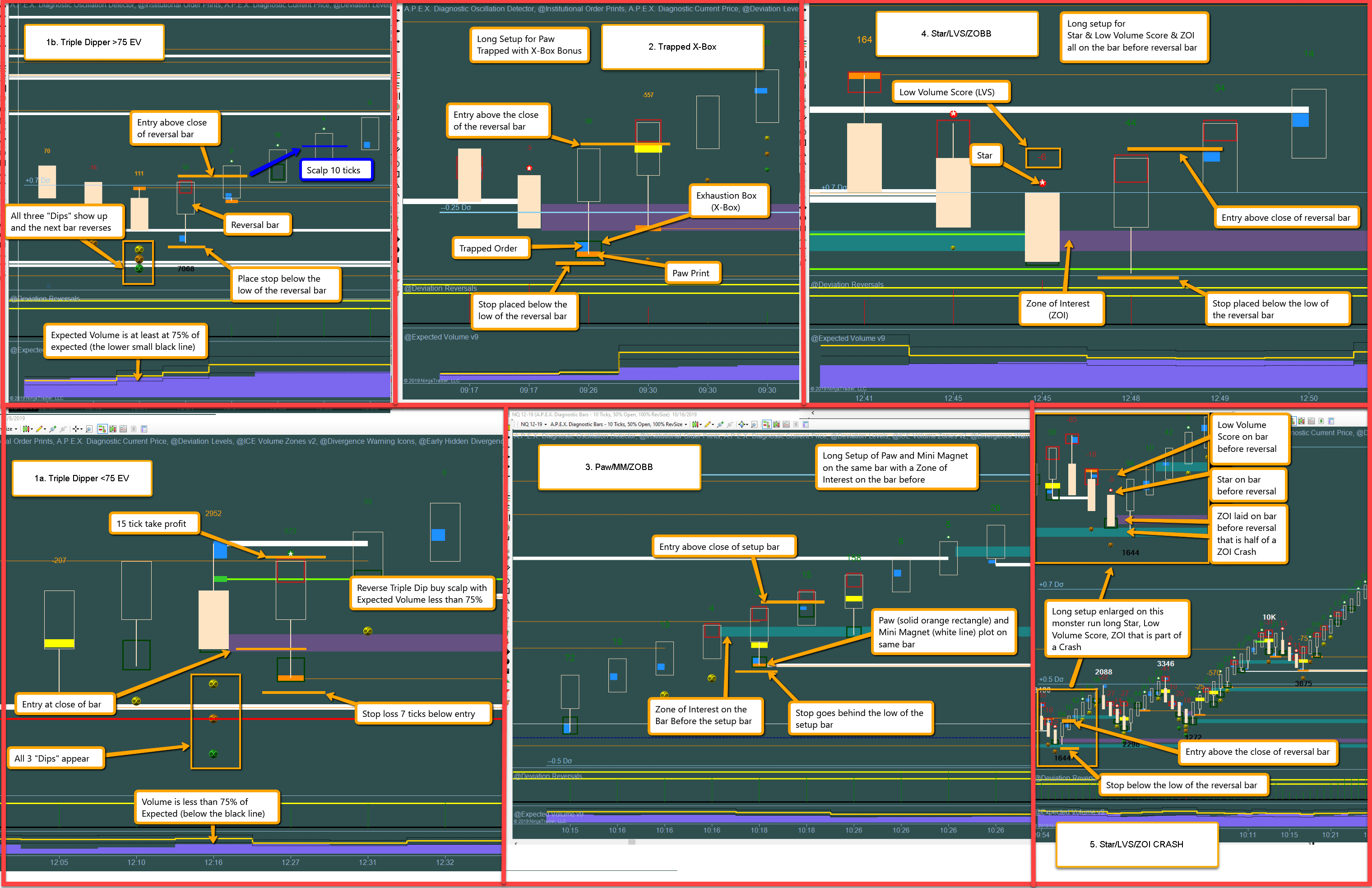
9) Sniper Setup 1: Triple Dip Scalp (And Bonus Setup (Master Setup 2 First! Watching all videos above before doing setup 1-4 as setup 2 is 85% of trades)
Triple Dipper Basics Video
Understanding > 75%
Understanding < 75%
Updating ATM's and High Volatility Markets For Triple Dipper
Note: < 75% setup has lower win ratio but a better risk reward ratio. Do not take the < 75% setup back to back as the market is trending.
10) Sniper Setup 3: Mini Magnet & Paw on Same Bar Bounced off ZOI (And Bonus Setup)
11) Sniper Setup 4: Star & Low Volume Score & Zone of Interest on Bar Before
12) Sniper Setup 5: Star & Low Volume Score & Zone of Interest on Bar Before - With Zone Of Interest Being Half A Crash
13) Sniper Setup 6: Third Bar Slings (TBS)
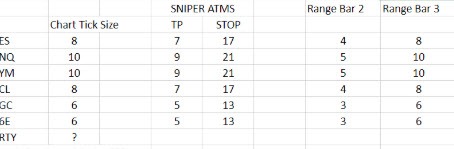
Note the 10 tick OPTIONAL stop is based on an 8 tick bars with a 2 tick wick on ES (or 12 tick on NQ). If you took every TBS trade this comes out to about the same results as using a 17 tick stop more losses but less lost when you lose. HOWEVER unless you are catching all of them you should use the 17 tick stop on ES or 21 tick stopon NQ.
Download Homework
14) Sniper Setup 7: Double Trapped Exhaustion Box DTX
Note the 10 tick OPTIONAL stop is based on an 8 tick bars with a 2 tick wick on ES (or 12 tick on NQ). If you took every TBS trade this comes out to about the same results as using a 17 tick stop more losses but less lost when you lose. HOWEVER unless you are catching all of them you should use the 17 tick stop on ES or 21 tick stopon NQ.
Download Homework
15) Elevator Setup 8
Note the 10 tick OPTIONAL stop is based on an 8 tick bars with a 2 tick wick on ES (or 12 tick on NQ). If you took every TBS trade this comes out to about the same results as using a 17 tick stop more losses but less lost when you lose. HOWEVER unless you are catching all of them you should use the 17 tick stop on ES or 21 tick stopon NQ.
Download Homework
16) Trailing Trades With Simplicity
How to trail trades for larger profits with Simplicity
How to use Simplicity With Sniper
How to setup Simplicty on your computer (if desired)
IQ Feed 7 Day Trial: Click HERE (Best customer Service)
Simplicity Advanced Review
Step by Step Simplicity Rules
Simplicity & Sniper Review and Important Lessons
Webinar Recordings From Previous Live Webinars (Focus On Setup 2 First - Important Setup 2 Information From Webinars Will be Posted in Mastering Setup 2 Section in Step 8 Above
Webinar Recordings Most Recent Webinars [older webinars have been moved to the corresponding topic sections]
ES Settings and walk through...
Setup 6: Third Bar Slings (TBS)
Download Homework
Trade by Trade WalkThrough
Double TX With Trend
ODD Made Simple
ES & Leading NQ Walls
Getting Ahead Of Obstructions
Trade Automation for Sniper Setup 4
(added in setup 4 above)
Videos moved
See TBS in section 13
See DTX in Section 14
See Elevator in Section 15
See Simplicity in Section 16
Simplicity advanced review in 16
Using HDD to increase your trading probability
Focus and Routine
HDD and LeeLoo
Circuit Breakers
ES Walk Through and TBS
ATM Pull Back Setup
Master Sniper Template For Automation
Cheat sheets and PDF on trading assistant page
Simplicity Step by Step Review
Simplicity Review and Important Lessons
Watch Webinars Above
Tutorials If Your In Bootcamp Trials and Feeling Overwhelmed This Section Is For You
If your new to futures, micros, trading and money management you will find these videos helpful!
Foundations: New Traders (And Anyone who hasn't watched them) Should Watch These Videos Before Trading Live
Futures and Touch Bracket and E Micro Training
(Click Square in Bottom Right to Make Video Full Screen)
Order Types, Money Management & Psychology Training
What To Do After Bootcamp Steps 1-4 (Check out Steps 1, 3, 4 Before BootCamp Expires
Whats Next? (Click Square in Bottom Right to Make Video Full Screen)
Now Its Time To Take It To The Next Level and Join the 10 % Club
Step 1
Sign Up For Your Elite Plan And Continue Your Journey To The 10% Club
Please Watch Video
Step 2
Apply For A Small Mentor Group Room
(After Watching Video)
Link below will appear after you sign up.
Step 3
Learn the 6-3 Plan To a 6 Figure Income in 1 Year starting on a single contract
Step 4
Begin the 90 Day Challenge To Make It To The 10% Club
(Download File Open It and Watch Video)
New 6-25-20
Copyright© 2019-2029 Apex Investing Institute All Rights Reserved.
| Disclaimer | Privacy Policy | Help Desk |
Chat On Side Of Page With A Support Specialist
Phone 1-888-APEX-WIN (888-946-2739)
RISK DISCLOSURE:
Futures and Forex trading contains substantial risk and is not for every investor. An investor could potentially lose all or more than the initial investment. Risk capital is money that can be lost without jeopardizing one's financial security or lifestyle. Only risk capital should be used for trading and only those with sufficient risk capital should consider trading. Past performance is not necessarily indicative of future results.
HYPOTHETICAL PERFORMANCE DISCLOSURE:
Hypothetical performance results have many inherent limitations, some of which are described below. No representation is being made that any account will or is likely to achieve profits or losses similar to those shown. In fact, there are frequently sharp differences between hypothetical performance results and the actual results subsequently achieved by any particular trading program. One of the limitations of hypothetical performance results is that they are generally prepared with the benefit of hindsight. In addition, hypothetical trading does not involve financial risk, and no hypothetical trading record can completely account for the impact of financial risk of actual trading. For example, the ability to withstand losses or to adhere to a particular trading program in spite of trading losses is material points, which can also adversely affect actual trading results. There are numerous other factors related to the markets in general or to the implementation of any specific trading program, which cannot be fully accounted for in the preparation of hypothetical performance results and all of which can adversely affect trading results.
Copyright© 2018 Apex Investing Institute Members Area. All Rights Reserved.